Bowling has been part of our lives for years — tournaments, training, alleys across the country and beyond. And because we could not find a place that brought together everything we needed, we started building it ourselves. At first it was a tool just for us — then for our bowling friends, then for their friends. Gradually it grew into something we live by and believe makes sense for the whole community: a place where players, tournament organizers, and center operators naturally meet. A platform focused exclusively on bowling has been missing in the world until now.
BOWLMINE is ad-free and its basic features are free.
What BOWLMINE does
It continuously collects data on tournaments, bowling centers, and alleys from public sources and supplements it with data from registered users, organizers, and operators. The result is a database that powers registration search, a chronological event calendar, a map of bowling centers with the nearest tournaments and registrations, and a marketplace for bowling equipment. It offers center operators management of their own listing, and organizers and coaches a tool for entering and publishing tournaments or training sessions.
For more detailed information write to info@bowlmine.com.
What is BOWLMINE's story?
| Year | |
|---|---|
| 2016 | The project launched as obsazovacky.info, with its first version focused on the Czech Republic and Slovakia. |
| 2017–2018 | Structure stabilized: Calendar, Players, Centers, Sources, Registration search. |
| 2025/2026 | System modernization, AI-assisted redesign, and added PWA support, a private listing system and player profiles, a multilingual interface. |
| 2026 | Registration of the bowlmine.com domain and a complete rework of the app for worldwide reach. |
Guides by role
BOWLMINE offers different tools depending on how you use the platform. Detailed guides are available for each role:
- Registered user – registration overview, calendar sync, watchdog, community, marketplace
- Event organizer – managing tournaments and training, registrations, results service, follower notifications
- Center operator – listing, radar, widget, watchdog
- Developer – data import via JSON-LD, widget
What information do the homepage panels show?
The Search panel can find up to 10 different names and display their event registrations on a single page. It is especially valued by players who use several variants of their name and by teammates. Events held on the same day are listed alongside each registration.
The Tournament program panel shows upcoming tournaments in three tabs: today, tomorrow, and the next playing day. Each tab shows an overview of events with the current number of registered players and free slots.
The Center map panel shows a preview map of bowling centers near the visitor's location and a list of the nearest centers with the number of upcoming tournaments. The Open Radar link goes to the full map page.
The TOP 10 largest events panel shows the 10 largest tournaments sorted by the current number of registered players.
The Marketplace panel shows the three newest listings from the bowling equipment marketplace. The full overview is available on the Marketplace page.
Bowling guide
Bowling guide is a clear hub for the basics of bowling — rules, scoring, throwing technique, and equipment choice. It suits beginners and lightly advanced players alike and keeps growing.
Can I buy or sell bowling equipment on BOWLMINE?
Yes — the Marketplace page is for buying, selling, and finding substitutes. Any registered user can post a listing with photos.
How do I use the tournament calendar?
In the Calendar you can see all events on a single page, or only events from a selected country or category, e.g. Slovakia.
Sorting is chronological, divided by months and days. Multi-day events are spread across days, and for each day only the rounds held that day are listed.
Calendar sync
Using the Save to calendar button you can get the Calendar.ics file; opening it imports all current registrations into the relevant local app at once.
Event registrations from BOWLMINE can also be imported into other calendar apps such as Apple iCal, Microsoft Outlook, or Google Calendar. First, copy the address from the registrations overview — use the copy button, which saves the address to the clipboard.
Google Calendar – Android
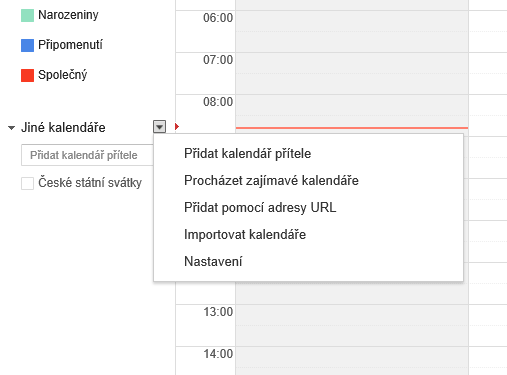
At the bottom of the left column on calendar.google.com, under the arrow next to Other calendars, there is a hidden dropdown menu with the item Add from URL (fig. 1.).
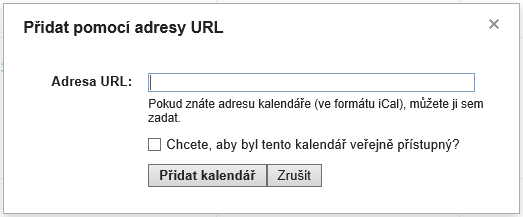
After clicking, a form with the same name (fig. 2.) appears, where you paste the address from the registrations overview.
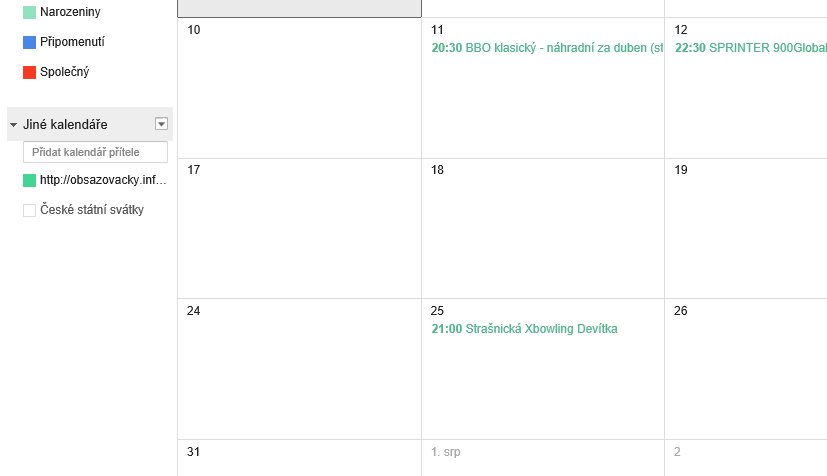
Pressing Add calendar closes the form, and the entered address appears as the name of a new calendar under Other calendars in the left column (you can rename the calendar).
To show registrations in the calendar, click the checkbox next to the name.
Outlook Calendar – Windows
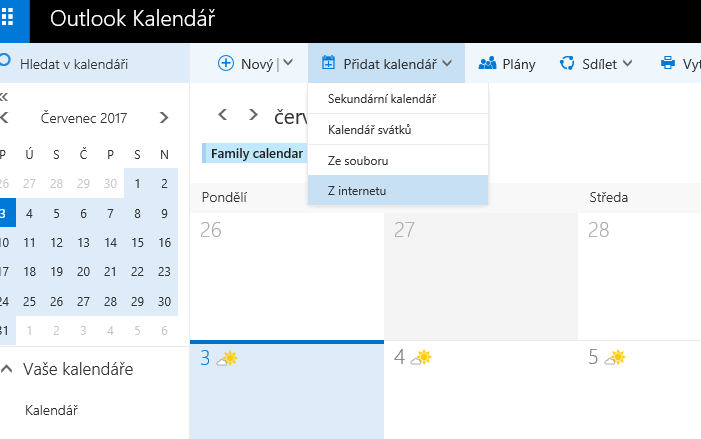
In the header of the calendar at calendar.live.com, the main menu contains the Add calendar dropdown, which hides the option From Internet (fig. 1.).
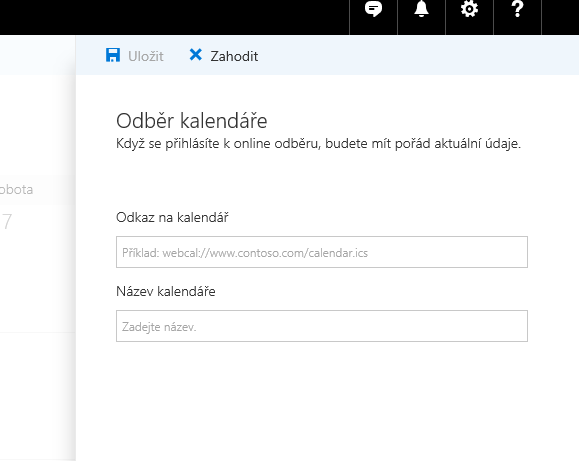
After clicking, a Subscribe to calendar form (fig. 2.) appears on the right side. Into its two fields, paste the address from the registrations overview and a name for the new calendar, e.g. BOWLMINE. Press Save to create the new calendar and load the items.
The service will monitor and update the new calendar approximately every 4 hours.
Apple iCloud Calendar – iPhone
Follow this guide, but instead of the address starting with webcal://files.apple.com/calendars/... paste the address from the registrations overview.